
SD CARD GUIDE · MR IT
UHS-I vs UHS-II SD Cards: What Is the Difference and Which Do You Need?
Two SD cards can look almost the same and cost very different amounts. The difference is the bus they use to talk to your camera or card reader. Here is what UHS-I and UHS-II mean, who benefits from UHS-II, and who does not.
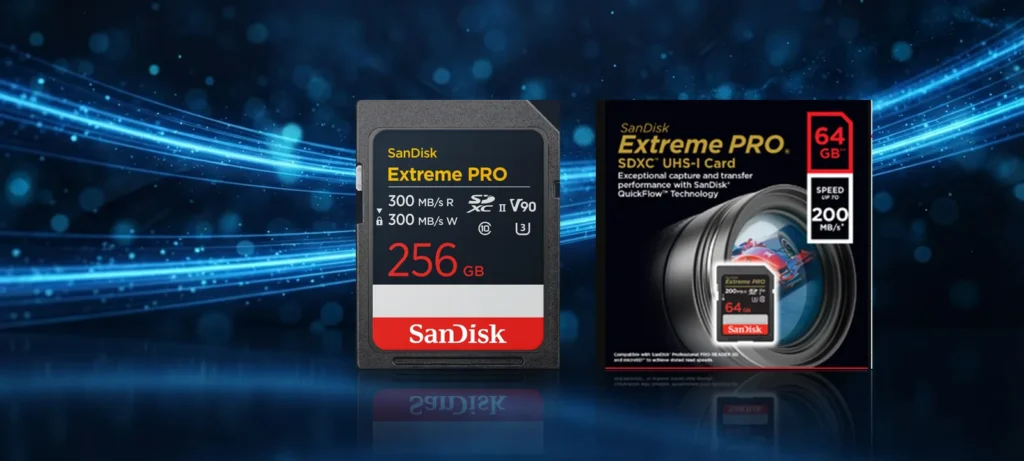
When you shop for an SD card, you will see labels such as UHS-I, UHS-II, U3 and V30. They are not marketing words. Each one is defined by the SD Association, the group that sets the SD card standard. This guide explains the first two, UHS-I and UHS-II, in plain language.
What does UHS mean?
UHS stands for Ultra High Speed. It describes the bus, which is the connection between the card and the device it is plugged into. Think of it as the width of the road. A faster road helps only if the card and the device can both use it.
The SD Association lists these bus speeds:
| Interface | Bus speed | Contact pins |
|---|---|---|
| High Speed | 25MB/s | One row |
| UHS-I | 50MB/s (SDR50, DDR50) or 104MB/s (SDR104) | One row |
| UHS-II | 156MB/s full duplex, or 312MB/s half duplex | Two rows |
The SD Association is careful to say that the maximum speed you actually see depends on the card itself and on the device. A card never exceeds what its own memory can do, so a UHS-II label alone does not tell you the speed of a particular card. Always read the speed printed on the card or its box.
How to tell them apart
Look at the pins
UHS-I cards have one row of gold contacts. UHS-II cards have a second row of contacts as well.
Look at the label
UHS-II cards usually show a Roman numeral II next to the UHS symbol. A UHS-I card shows the numeral I.
Check your device
Your camera or reader manual will say whether it supports UHS-II. If it only says UHS-I, a UHS-II card will not run faster.
Will a UHS-II card work in my UHS-I camera?
Yes, in general. The SD Association states that the first row of pins on a UHS-II card provides backward compatibility with older host devices. In a device that supports only UHS-I, the card works but runs at UHS-I speed. The second row of pins is simply not used. You will not damage anything, but you also will not get UHS-II speed.
The reverse is also fine. A UHS-I card in a UHS-II camera works at UHS-I speed.
Who really needs UHS-II?
UHS-II makes sense when your device writes a lot of data quickly or when you copy large amounts of data off the card.
- Burst shooting: if you shoot long bursts of large RAW files, the camera can clear its buffer faster with a card that can write quickly.
- High-bit-rate video: some video modes need the card to keep up a high minimum write speed. The SD Association states that the V60 and V90 video speed classes are used in UHS-II mode or faster. If your camera asks for V60 or V90, you need a UHS-II card.
- Fast offloading: a UHS-II card in a UHS-II card reader copies large shoots to your computer much faster than a UHS-I card. Both the card and the reader must support UHS-II.
Who is fine with UHS-I?
Most people. A UHS-I card is the practical choice for holiday photos, family video, entry-level and mid-range cameras, and many devices that record at standard bit rates. UHS-I cards also cost noticeably less. For example, the UHS-II V90 cards on our list cost several times as much as UHS-I cards of the same capacity.
If your camera manual only asks for UHS Speed Class 3 (U3) or V30, a good UHS-I card will do the job.
What about U3, V30, V60 and V90?
These are separate labels for the minimum sustained write speed a card promises, which matters for video. U3 means at least 30MB/s. V30, V60 and V90 mean at least 30, 60 and 90MB/s. They describe the lowest speed the card should keep up while recording, not the fastest speed it can reach. UHS-I or UHS-II describes the interface. A card has both: an interface, and a speed class.
Our UHS-I and UHS-II SD cards
UHS-II
- SanDisk Extreme PRO SD UHS-II (V90) for high-bit-rate video and fast shooting. Pre-order.
- SanDisk Extreme PRO SD UHS-II (V60). Pre-order.
UHS-I
- SanDisk Extreme PRO SDXC, ready stock at our shop.
- SanDisk Extreme SDXC Card, ready stock.
- SanDisk Ultra SD Card, ready stock.
- SanDisk Extreme PRO SD UHS-I (V30). Pre-order.
- SanDisk Extreme Go SD and SanDisk Ultra Go SD. Pre-order.